State Bank of India (SBI) also provides a platform to buy or sell IPO shares. State Bank of India (SBI) provides a net-banking website and Yono Mobile app for the users to use their service easily. Investors who want to apply for an IPO through their SBI bank account, then apply through the SBI Net Banking or YONO Mobile Appl. SBI Net Banking is a straightforward process. Today, we bring you a guide to apply for an IPO through an SBI bank account.
Eligibility and Requirements
Before you start to apply for the IPO through SBI Bank, first check whether you meet the basic requirements or not-
- You must hold a valid Permanent Account Number (PAN).
- You must have an active SBI savings account with sufficient funds.
- You must have a net banking facility enabled in your SBI bank account.
- You must have a Demat account with NSDL or CDSL.
- You must be over 10 years old and file a paper IPO application form.
Also read: Top 10 Most Successful IPOs in India: Sigachi, Vibhor Steel & More
Step-by-Step Process to Apply for IPO Through SBI
1. Login to SBI Net Banking: Visit the SBI Net Banking website by clicking on the link, www.onlinesbi.com. On the home page, Click on the Login button in the Personal banking section. Go to the ‘Personal Banking’ section. Now, click on Continue to log in and log in using your credentials. Enter your Username and Password. Make sure to enter carefully because you only have 3 attempts.
2. Navigate to e-Services: Once you log in to your account. Navigate and click on the ‘e-Services’ tab in the Menu Bar. Now, from the menu on the left, select ‘Demat & ASBA Services’.
3. Select IPO Equity: On the “Demat & ASBA Services” page, you will see three sections named Demat Services, ASBA Services and Other Services. Under the ‘ASBA Services’ section, you need to click on ‘IPO Equity’.Read the terms and conditions and click on ‘Accept’.
4. Choose the IPO: Now, you have to choose the IPO to which you want to apply. You will see a list of available IPOs with their bidding dates on the page. Select the IPO you wish to apply for and click on ‘Accept’.
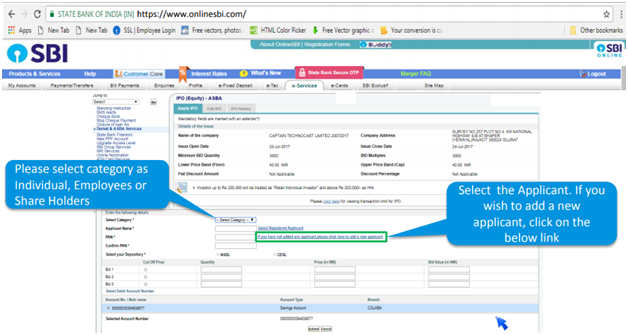
5. Fill in the Details: On the IPO page, you need to enter details like bidding quantity, price of each share, IPO open, etc. There is an IPO form on the screen where you need to enter various details:
- Category of the applicant: Choose between Individual, Employee, or Shareholder.
- Applicant details: If you are applying for yourself, select your name. Your PAN and Demat details will be auto-filled.
- IPO details: Enter the number of shares you wish to bid for and the bid price. If you want to bid at the cut-off price, select the ‘Cut-off’ option. This ensures you accept the allotment at the price decided by the company.
6. Submit the Application: After filling in all the required details, click on the ‘Submit’ button.
7. Application Confirmation: Once your application is submitted. You successfully applied to the IPO. On the application confirmation page, you will see a confirmation page listing all the IPOs you have applied for. Verify the details and ensure the lien amount (the money blocked for the IPO) is correctly marked.
Modifying or Editing Your Application
If you want to make changes to your applied IPO application, you can also modify and edit your application. Here are the steps to modify your application for a particular IPO.
- Visit the SBI Net Banking website by clicking on the link, www.onlinesbi.com. On the home page, Click on the Login button in the Personal banking section. Now, click on Continue to log in and log in using your credentials. Enter your Username and Password. Make sure to enter carefully because you only have 3 attempts.
- Once you log in to your account. Navigate and click on the ‘e-Services’ tab in the Menu Bar. Now, from the menu on the left, select ‘Demat & ASBA Services’.
- On the “Demat & ASBA Services” page, you will see three sections named Demat Services, ASBA Services and Other Services. Under the ‘ASBA Services’ section, you need to click on ‘IPO Equity’.
- After IPO Equity, click on the “Edit IPO”.
- You can see all of your applied IPO lists. Click on the “Edit IPO” and make the necessary changes, and resubmit the form.
Advantages of Choosing SBI for IPO
Applying for IPO with State Bank of India offers several advantages-
- ASBA Facility: SBI is based on the Application Supported by Blocked Amount (ASBA) mechanism, which ensures the investor; ‘s amount is in the account until share allotment. Even after bidding, investors can earn interest on their fund and money deducted at the time allotment.
- Convenience and Accessibility: SBI provides net banking services which are easy to access anytime and anywhere. Investors can apply for an IPO with their user-friendly net banking website or YONO mobile app.
- Security: SBI is a government bank. They have strong security measures which protect your financial and personal information during the IPO application process.
Also read: What is an IPO Lockups? Definition and Purpose
Conclusion
SBI is one of the oldest and most trustworthy banking service providers in India. Choosing SBI net banking for the IPO is the best decision because it is secure and trustworthy. There is no chance of fraud with the State Bank Of Inai. In addition, Applying for an IPO through SBI Net Banking is also a convenient process. Thanks to the ASBA (Application Supported by Blocked Amount) mechanism, which makes SBI ideal for the UPI. This process ensures that your application money remains in your account and earns interest until the shares are allotted, thus providing both security and liquidity. You can easily bid on your required IPO with SBI net banking by following our guidelines.